Showing posts with label advertising. Show all posts

Increasing Sales On Etsy

I have actually written a lot about how to increase your sales on Etsy. From taking better photos to my series and eBook on Facebook Advertising for Etsy. What I have not talked enough about is checking to see what is and isn't working for you. Some things are easy to check. Here are a couple of the easier ones to check to see if they are working for you:

1. Relevant Keywords - If you see an increase in people visiting your shop and items from Search on your Stat page of Etsy, chances are your key words are working for you. Please note that Etsy only shows incoming traffic from people that used one of your tags and clicked through. There is no way to tell how many people actually saw your item on the search page.

2. More Traffic  - If some of the things you are doing are working you should see in increase in traffic to your shop and item pages. If you are doing more on Facebook you'll see Facebook on your list of traffic sites. Being in more Treasuries will increase your traffic as well and will show under the Treasure heading under Traffic Sources on Etsy. **Please note that some traffic such as Twitter and some of Facebook will show under the generic source of Direct Traffic and isn't as easy to track**

More traffic does not always equate to more immediate sales. Sometimes people will favorite in Etsy or bookmark a page for later. It isn't as easy to track if a favorite or bookmark makes a sale later unless you want to go back and check all your hearts against all of your sales. More traffic does however equate to more potential sales.

I would like to hear more from you about what you can verify has worked and what you have verified has not worked for you. Feel free to leave a comment or email me at MarketMyShop@gmail.com

How To Run A Sale On Etsy

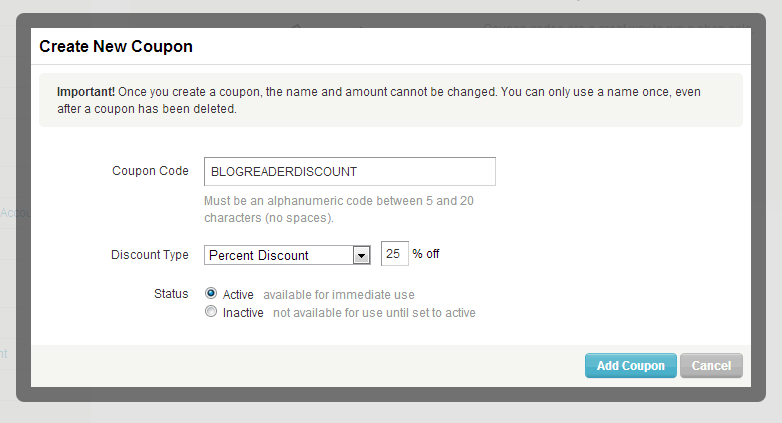
From time to time I like to run a sale in my Etsy shop: http://MarketMyShop.etsy.com Etsy makes it very simple to run a sale. I just put up a 25% off coupon for my shop to show you how easy it is! Just enter code "BLOGREADERDISCOUNT" at checkout! Running a sale is a great way to get a small boost in sales overall. Here is how you create a coupon code on Etsy:

Step 1: Just mouse over your shop name in the top right hand corner of your page and select Coupon Codes.


Step 2: Click on the button that says Create Coupon.


Step 3: Create a unique coupon code. Choose either % discount or Free Shipping. Make sure the Active button is clicked and then hit Add Coupon.


Step 4: Share your coupon code on Facebook, Twitter, Email and any other ways you can think of. Some people even run an advertising campaign with their sales.

Do you run sales in your shop? If so, I would love to hear your experiences. Leave a comment or send me an email to MarketMyShop@gmail.com

Share Your Etsy Shop!


Word of mouth is the best form of advertising. It always has been and always will be. We have not had a share your shop day in a while so let's do that today. If you have time, visit the shops and favorite them and add them to your circle.

Mine:

Market My Shop on Etsy Currently all I have is my nifty Facebook Advertising Guide but I am still working on several other items that will be added as soon as I have time to finish them.

Tangled Metal Shop on Etsy This is my shop where I sell chainmaille and steampunk jewelry, accessories and home decor.

Magpie Lane Supplies Here is where I sell a few supplies. Not a lot in here but a few findings,  chainmail rings and scrapbooking supplies.

At the time of writing this Etsy seems to be down. So, you may not be able to visit any stores. Keep trying, Etsy is working on it.

List your shop in the comments with a brief description and have a GREAT weekend!

Etsy Back To School Sales


It seems school starts earlier and earlier each year. I remember when I was a kid it started in September. Now it seems that most schools start in Mid-August. Now is the time to start your Back To School Sales! Remember that it isn't just elementary and high school about to start back up, it is also college.

I generally offer a percentage discount though an Etsy coupon code. Some people offer free shipping on their orders. The choice is up to you but be sure to take advantage of it. Put "Back To School" in your tags and titles on items that are specifically for school.

Oh, and don't forget the teachers! They are going back to school as well! So, if you have items that would look great on a classroom wall or a teacher's desk, there is another opportunity for you. I hope your Back To School Sales are the best they have ever been. Don't forget Halloween is just around the corner so you may want to dust off a few of your items...

Leave a comment or send me an email to MarketMyShop@gmail.com I would love to hear what you have to say.

As always, my blog is 100% free. People ask me all the time why I do this. When I started Etsy there just wasn't all that much info out there to help me figure it all our. Etsy tends to make their instructions difficult to follow. I wanted to be able to help others by making things easier to understand.

People also ask how I make enough money doing this. The honest answer is I don't. I do sell a Facebook Advertising Guide in my Market My Shop Etsy Shop. I also do a little consulting on a one one one basis. If you are getting something out of this blog and you'd like to 'buy me a drink' or say 'thank you' you can send a gift through PayPal using my email: MarketMyShop@gmail.com

How Are Your July Sales?


I ended up having a great June in my Tangled Metal Etsy Shop. I averaged one sale per day. Then July hit. My average so far for the month is one sale every two days. July is traditionally a slow month on Etsy. Part of the reason is that so many families vacation in July. So, you must come up with cleaver ideas and tactics to make some sales.

Christmas in July is a great way to make a few extra sales during the month. I do not usually do a sale in my shop in July but next year I do plan to. There is a lot of marketing going into Christmas in July and that means that with a few well placed tags and titles you can let someone else pay for the advertising, namely Etsy.

July is also a good month to get into gear for Back to School. Having a back to school sale is always a great idea. Here again, you are able to, with some well placed tags and titles, allow someone else to put out the advertising dollars for you. The best form of advertising is the free stuff!

I am always looking for new ideas to help increase sales in traditionally slow times. I would love to hear what you have done to increase your sales. I run a brick and mortar in addition to wholesaling and having an Etsy shop. I am very fortunate that when one area is slow is sales another area usually picks up the slack. Feel free to leave a comment or send me an email to MarketMyShop@gmail.com

Advertising For Etsy Shops

Where do you advertise your Etsy shop? Advertising is one of the things that most people feel is a complete waste of money. That is about as far from the truth as you can get. Do you really think that if Coke or Pepsi stopped advertising their current customer base would be enough to pay all of their stock holders their dividends?

The main purpose of advertising is to get new customers. The secondary purpose is to inform current customers of special deals. I advertise exclusively on Facebook now.  Well, other than the standard link in email, business cards and signatures in groups and message boards. I direct all my traffic to my Facebook page.

From my Facebook page I list new products and do giveaways. When I have a sale the fans on Facebook are the first to know and sometimes the only to know. I spend about $50 a month on Facebook ads and I am well compensated for it.

Where do you advertise and how is it working out for you?

Having More Than One Etsy Shop Part 2

Yesterday we started talking about whether or not it is a good idea to have more than one Etsy shop. I went through some of the reasons for having more than one shop. Today I would like to go through the process of making a smooth transition.

Your first instinct might be to just deactivate all your items from your current shop and list them in the new shop. While this is the quick and easy way to go about it, you lose a lot. By a lot I mean all of your previous marketing for that item.

If you have items that are not one of a kind go ahead and leave them up in your current shop and list them in your new shop. Put a link in your current shop to the item in your new shop. Fortunately Etsy does allow for links inside of Etsy to Etsy. Putting the link is simple, just copy the address from your address bar and paste it into the document.

Be sure to put a note on the products in the first store letting your customers know that it will no longer be available in that store and give them a link to the new store item listing. If you have one of a kind items you can do the same thing, but just be careful to keep track in case it sells from one store because you'll need to remove it by hand from the other store.

Here are a few tips to help you out.
1. Set a deadline for the switch and keep to it. First of the month is usually a pretty good date to make changes.
2. Be sure to send an email note to everyone that has bought from you that you are opening a second shop and that some items will only be available in a different shop.
3. Remember to put a link in your shop bio and shop announcement.
4. Try to tie your name into the second shop. If your shop is Beth's Best Beads set the name on the second shop to Beth's Best Beads Too.
5. Be sure you announce your changes in your blog, newsletter, Twitter, Facebook, Teams and signatures on your e-mail. Make it easy for your customers to find you.

If you have items to add to this list feel free to leave a comment. I will be back tomorrow with a new and fresh topic.

Having More Than One Etsy Shop?

After closing my ArtFire Shop and posting about it here, a reader brought up the question of having more than one Etsy shop. The simple answer is, yes, it is just fine to have more than one Etsy shop. Of course, I think it may be a good idea to go into detail on the answer.

I have actually been contemplating this very idea for a while now. I have two very diverse areas of expertise. I make jewelry and I make chainmail. There is a lot of cross over in the two. Most of the chainmail I make today is in the form of jewelry. Of course I make more than one style of jewelry, so that is another whole aspect.

Etsy gives you the ability to set up 10 categories in your shop. Currently mine are broken into chainmail items and steampunk items. Steampunk is the style of jewelry most prevalent in my shop after chainmail. So, I have my categories broken into sections like "Chainmail Necklaces" "Chainmail Earrings" "Chainmail Geekery" "Steampunk Necklaces" "Steampunk Earrings" and so on. It is just about to the point that I do not have enough sections for all that I am making.

Now, when I start making jewelry that isn't considered steampunk I will have to either make my sections more broad or start another shop. If your shop seems cluttered that is an indication that you need more than one shop. If you sell vintage clothing and handmade soap and jewelry you may need three shops.

A word of caution on having multiple shops, you will have to market each shop individually even if they are tied together. To make it a bit easier I would try and make the names of the shops work together. If I were to split my shops I would probably have "Tangled Metal Steampunk" "Tangled Metal Chainmail" and maybe "Tangled Metal Fine Jewelry" though I do not have the energy at the moment to do so. Currently I have about 230 items in my shop and they are about equal in the amount of steampunk and chainmail. When that changes or I have over 500 items in my shop I do plan to open a second shop.

I will talk a little more about this tomorrow as I think it is a pretty good topic to cover. Until then, have a great day and be sure to send your questions to: MarketMyShop@gmail.com

One Shop Versus Many


After much consideration and contemplation I have decided to close my ArtFire Studio shop. My Etsy Shop is doing very well. I am getting a lot of traffic and I am making sales. I find myself spending more time promoting the Etsy shop than I ever did on ArtFire.

Don't get me wrong, ArtFire has a great thing going for them. They are easy to use, easy to promote and have a lot of things I wish Etsy would adopt. The problem is that ArtFire does not get the traffic that Etsy does. A portion of my sales are from other Etsy shop owners. I never had that on ArtFire. If I spend a day in the studio working on jewelry I still get a couple hundred views on Etsy, whereas, during the same time on ArtFire I may get a dozen views.

I am in it for the money. I mean, if I don't make money then I have to go back to work for someone else. I enjoy setting my hours and doing what I want with my time. Being self employed means that you rely on every penny that you make. Not only do you have to pay the bills you have to be able to restock supplies. For me it came down to dollar amounts. Artfire just wasn't producing like Etsy does.

Dropping the ArtFire shop will give me more time to spend in my Etsy shop and here, blogging ways to help you make money too! What kind of experience have you had running multiple shops? For those that say build it and forget it, I am sorry to say, no matter what kind of shop you have, you have to work on it and promote it or nothing will ever come of it. Or if something does come of it, it won't be much. If you've had a different experience I would like to hear it.

Facebook Advertising: Design Your Advert


So, now you have your budget set, some 135 character descriptions and some type of photo that is relevant to your shop. Now it is time to start your ad. It is time to head over to  http://www.facebook.com/ads/create/

At some point before you create your ad you will have to set your payment option. You are able to use either a credit card or PayPal. The way Facebook bills is pretty random. They will wait until you have spent $10 to $18 and then bill your credit card or your PayPal account.

Step one is to determine where you will send people who click on your ad. Clicking on "Destination" will bring up a drop-down list of all the pages you have on your account. Choose the page that you want to associate with the ad.  Next choose Facebook Adverts and Facebook Adverts for pages.

Next is the Destination Tab. If you have a personalized landing page, I would suggest sending them there. (I will have an article about personalized landing pages soon) Otherwise, you should probably just send them to your wall. Title is set by Facebook and is grayed out.

Next you get to enter your body(description). Facebook says: "Use this section to further explain the product or service that your advert is about. Emphasise benefits to the user, unique qualities of your product/service and any special offers. End with a clear call-to-action that users should take if they like your advert." I would refrain from saying things like "Click Here" or "For More Information" and just stick with a nice relevant description of your shop.

That concludes the Design your Advert section and today's lesson. Tomorrow I will go through the "Targeting" section. Let me know if you have any questions.

More on Facebook Advertising


You have managed to set aside some advertising dollars. You are ready to start advertising your Facebook Fan Page, or are you. Before you start advertising you need to make sure your Facebook Fan Page is set up correctly, looks great and is engaging. Click "facebook" in the Labels section to the right will bring up several articles I have written on making sure your facebook is doing what it needs to be doing.

If you are confident, then it is time to move on to your first step. Go to http://www.facebook.com/advertising/ and click on "Create an Advert. You must be logged into your profile that your Fan Page was created from. If you are not, Facebook will give you the option to switch to it.

Once you get to the actual page where you create the advertisement, take some time to hover over each and every "?" to see what each item is. Before we move on, I would like you to write up three or four descriptions of your business using only 135 characters. That will be the length of your ad. Be creative. Be engaging. Be mysterious. Be direct. Be what you think will make people want to click on your ad.

That is all for today. I'll be back tomorrow and we'll look at what needs to be filled out to create your ad. In the meantime, I would like to know what your fan base is on your Facebook page. 

Facebook Ads For Your Etsy Shop


Before we get down to the step by step process, I would like to share a little bit of information on the best way to use Facebook advertising, or any advertising for that matter. I would like to share some of my trial and errors so that you do not have to go through the same mistakes.

First of all, you want repeat business from every customer. That is the main goal. Originally I was using Facebook Ads and Google AdWords to point people to my main website: http://www.TangledMetal.com I have nothing for sale on my site. The only way I could track my hits was Google Analytic. It is difficult at best to see who was coming back. I chalked that up to not a good use of advertising dollars.

Next thing I did was use Facebook Ads and Google AdWords pointing to my Etsy shop: http://TangledMetal.etsy.com Though I did see an increase in traffic during the time I was pointing to Etsy there was still no real way of finding out who was coming to the shop because of the ads and certainly no way of knowing if the people who bought were a direct result of the ads or not.

My last experiment was to try and get people to "Like" my Facebook page: http://www.facebook.com/TangledMetal This concept makes the most sense of any of the previous ideas. Once someone is a fan of your Facebook page you have them. Of course they could "unLike" your page but statics show that is not very likely. Once they are a fan you can track purchases by sharing coupon codes to just your fans. It also gives you a boost because you see the number of fans growing every day.

Tomorrow I will get in the "how to's" and "step by step" of setting up Facebook Ads. Feel free to let me know if you have any questions. Either by comment or through email: MarketMyShop.blogger.com

Facebook Advertising for Etsy

I have tried a few forms of advertising, from Google AdWords to buying impressions on blogs. So far, the best results have come from my Facebook Ad Campaign. In the last three months I went from just under 500 to over 1100 fans to my Facebook page. That does not seem like much but it has brought a lot of traffic to my Etsy shop and I can directly attribute several sales directly from my Facebook page.

Before I start to get into how to go about starting a Facebook Advertising Campaign let me first talk about budgeting. We all set budgets for materials, internet and tools. If you want to have a successful advertising campaign you must set a budget. My budget right now is $50 a month. That is  $600 a year. It seems like a lot but the return can be huge.

The great thing about Facebook advertising is that the fans you have are a short term and long term investment. The fan may not buy from you today or tomorrow or even this year, but one day you'll post the right picture or special and that person will buy something that pays for a full month of advertising.

So, with all of that being said, sit down and try to figure out what it will take to dedicate $50 a month for advertising. It might mean no Starbucks coffee for a few days. It might mean not renting a movie or buying a pair of shoes. Whatever you have to sacrifice today will worth every penny and more in the future. Don't even call it a sacrifice, call it a postponement.

That is all for today. Come back tomorrow with your $50 a month budget. If you cannot come up with a $50 a month budget come up with some form of steady advertising budget that you can handle and I will do my best to help you with that as well. Feel free to ask any questions you may have either as a comment or email: MarketMyShop@gmail.com

Free Etsy Shop Link Day!


And we're back, I think.... There were some interesting technical problems over the last few weeks and I am pretty confidant that those are now cleared up. There was some lost data and some other glitches that just reminds me that I need to back EVERYTHING up. Lesson learned.

To get back into the swing of things I would like to invite all of you to reply with your Etsy or Artfire or any other shop link. (That is of course within reason and not anything in the R-Rated area) I will do this from time to time to make sure that all of the new followers have a chance to see what you are doing with your shop.

In further news, I am in the process of writing some mini-books on Relevancy, Advertising, SEO and more for your Etsy Shops. Each of these mini-books will be 5 to 7 pages long and will be broken into beginner, intermediate and expert level. I plan to open an Etsy shop and sell these books as well as selling them directly from my website. What would you price them at?

Well that is it for today. I will be back tomorrow with something new and completely different for you to ponder. In the meantime, feel free to send me an email at MarketMyShop@gmail.com with questions or comments. And please leave your link below in the comments section.

Targeting Your Market


Some people believe that it is better to target a huge market to get noticed. I disagree. I believe the more you narrow down your market the easier it is to get to them. With Christmas here it is now time to start thinking about how you plan to improve your sales for 2012.

It all starts with defining your product. In the course of defining you should think about who would buy your product. Get very specific. How old is he/she? What kind of income bracket do they fall into? What kind of job do they have? How do they spend their weekends? Why do they want to buy your product?

Create the perfect model of who buys your product and market to them. Both Google AdWords and Facebook advertising make it easy to advertise to the model you just created. You can even target them by what time they are on the Internet.

Just like in the dartboard above, the main target is a small one with plenty of room around it. As long as you are always aiming for a bulls-eye you are going to hit something outside of it, even if it is the wall the target is hanging on. Aim for your ideal customer and concentrate on talking to them.

Etsy Shop Banners


Hello, everyone. Sorry I did not make it back to post yesterday. I ended up with a bit of a rush order over the weekend and I spent yesterday completing it. I am back now and today I would like to touch on the seasonal rotation of your shop banners.

Many people put a lot of time and energy into their banner. After all, it is one of the very first things that they see when they go to your shop. Your banner is the sign over the virtual door to your store. It says who you are, what you do and how professional you are. It says a lot.

Do I make my own banners? No. Certainly not. I am a jewelry designer and maker, and graphics are just not my thing. Don't get me wrong, I know my way around Photoshop and Illustrator, but I am not a graphic designer. I know that and I made sure to hire someone who was: Curious Crow Creative Shop Banners, Printable Tags and Collage Sheets are her specialty.

It still amazes me that people out there have terrible banners. I mean I have seen some really bad ones. Today I ask that you take stock of your own banner. Try to look at it through your customer's eyes. Is it catchy, is it inviting, does it have your shop name on it? Yes, it is true I have seen many a shop banner with no shop name on it!

Maybe you did it yourself, maybe you hired it out. Either way, today is a great day to make sure that it is doing the job you want it to do. If it isn't what you think it should be, get a new one made. Curious Crow Creative makes wonderful banners that are both affordable and beautiful. She does everything from seasonal to custom work. Her prices are VERY competitive and she is a pleasure to work with.

That is it for today. I will be back tomorrow to talk about more things that will help you improve your shop. If you have any questions please feel free to comment or email me at MarketMyShop@blogspot.com

10 Tips For Holiday Promotions

Tomorrow is Thanksgiving Day and Christmas is but a month away. These are the biggest shopping days of the year. If you are having a sale you need to get the word out. Today I have come up with a few ideas to help you out this year and to prepare for next year.

1. If you can afford it, send a post card to everyone who bought from you during the year. Wish them a happy holiday and offer them a special deal. Maybe free shipping or 20% off. Mail this out the week of Thanksgiving so it is in their mailbox when they get home.

2. Send a virtual happy holiday card to all your shoppers. Same as above but no postage cost.

3. Tweet a link to your shop/sale 3 or 4 times a day. Make sure the tweet is different each time. Remember not everyone is on Twitter at the same time. Be sure to make some tweets in between so as not to sound too spammy.

4. Look for forums talking about sales and specials and post yours in the appropriate threads. Again try not to be too spammy.

5. Change your email signature to include information about your sale.

6. Put ads in Craigslist. This can really work, especially if you offer custom made items. Just be sure not to post the same ad more than once.

7. Get together with a few of your fellow crafters and put a cooperative ad out there somewhere. Maybe in the local paper or even a national magazine. What seems too expensive for you alone may not seem so bad split 6 ways or more. Co-Op ads are the best way to get exposure for a fraction of the individual.

8. Write a press release and send it out. That's right, a sale is newsworthy. Send it to your favorite bloggers, newspapers, magazines both online and off.

9. Make sure your listings have links to your sections, especially if you have a sale section.

10. Don't put anything on sale that you can't afford to. If your sale price is going to cause you to lose money, exclude the item from the sale and make it very plain. Or raise the price of those items so that if someone does want it, you won't lose money in the sale.

That is it for today. I hope each and every one of you have a happy and safe Holiday weekend. I will be back Monday. In the meantime, leave your comments or send me an email: MarketMyShop@gmail.com

Get More Views On Etsy


We are all looking to get more views for our shops. More views mean more potential for sales. Of course, it only takes one view from the right one person to make a sale. There are a few things that you can do to help increase your views. Today I would like to point a few of those out.

1. Add more items to your shop. A lot of people talk about a magic number of items in your shop. At that magic number you start to make sales. While everyone seems to have a different magic number most agree it is around or over 100 items. More items means more results in searches and more items to look through.

2. Link to your shop sections. If you have 10 pairs of earrings you can have 10 potential views. Within your listing say something like "For more variety see my Earrings Section http://www.etsy.com/shop/TangledMetal?section_id=7955478" This will get people to view more items in your shop per visit. If you have an item that isn't in a section link to the main page of your shop. Every listing should have a link to somewhere in your shop.

3. Blog about it. If you have a blog, mention and link to shop sections as well as the items. Directing someone to a section in your shop gives them far more options than just to an item, even if there is a link to the section from the item.

4. Tweet about it. Tweet about the sections in your shop. It will get people to go to your shop rather than look at the item in Twitter. It is easy not to go to the item if it is shown in Twitter.

5. Put your best face forward. Put the best items you have on the front page of your shop. Enable the Rearrange Shop function and move the best to the front. Try to put a variety of items on the first page. Also put a broad price range on the page. When you renew or add items remember Etsy puts them on the first page of your shop so you need to rearrange after adding new items or renewing items unless you want them on the first page. Also make sure that you are not duplicating your "Featured" items.

Maybe something here is a new idea for you or maybe you just forgot about doing it. Every little bit you can do to offer your potential customers a variety the better chance you have to convert them to a sale. Please feel free to add items to the list in the comments. Or if you don't understand, ask a question.

Etsy Surprise Etsy Search Ads


By now most of you know the surprise, Etsy is launching their new Search Ads. More than likely you have already signed up but is your shop ready? Are your pictures perfect? Is your title relevant? Are your tags good? Are your descriptions informative and engaging? It is never too late.

The first thing people will see in your new ad is your picture. If you do nothing else, make sure your first picture is a great one. Make sure it is clear and easy to tell what it is. Make sure the background isn't too busy and distracting. Make it look like the pictures you see in front page treasuries on Etsy.

Though it hasn't been said, I am guessing that the title will at least partially show up under the picture in the ad like regular in search. make sure that your first three words are accurate for your image and contain relevant key words. You probably already have done this when you were optimizing but check to make sure.

Your tags are going to be used to decide when to place your ad. Make sure your keywords are ones that would cause customers to find you anyway. This will help with items that have a lot of competition like Steampunk jewelry. Etsy created a list of keywords that are searched a lot and made a list along with a description of how pricing plays into it. Search Ad Keyword Pricing It might be a good idea to look at this list for ideas on keywords. I know I did.

Lastly, the description is what is going to convert your lookers into your buyers. Describe the item. Describe the shape, the feel, the measurements, how it works, how it was created and how it will make your customer feel. That is right, describe the emotional response your customers will have by putting it on, using it, looking at it, smelling it, etc. That is the way to sell the item, describe why they need it.

I know this is a lot to take in on a Monday morning. It was a lot to write! As always please let me know if you have questions or comments either here or via email at MarketMyShop@gmail.com

I am starting to get the website together but it is not even to a point of uploading yet. I will let you all know when it is done. Hopefully before the Holidays.

Word Of Mouth Advertising


The very best form of advertising is word of mouth. You just cannot beat it when someone recommends your product or service to someone. This gives your shop an endorsement of someone who has dealt with you. This is the kind of advertising that we all want. How do you get it?

It does not matter if you are in front of your customer at a show or emailing half a world a way, there are some important things to always remember. The customer may not always be right, but they should always be treated with respect. You cannot make every customer happy but it should be your goal to always try.

Always be up front with them. If you set a time for delivery of a custom product, either deliver on the day stated or contact them BEFORE the deadline to let them know if there is a problem and find out how they would like you to proceed. People are much more forgiving if you let them know that there will be a delay before a deadline. That way, if the item was a gift or time sensitive they have time to figure out if they will have time to get it to the recipient or if they need their money back. Even if you end up issuing a refund, chances are you have not burned any bridges and the customer will remember your honesty and order from you again one day.

The point is, you must go above and beyond at every step of the way to help your customer to remember just how good you and your product are. The better you treat them, the more likely they will be to spread the word. I leave you today with a few tips that may not always help but surely couldn't hurt.

1. Put more than one business card in every order you send out, especially during the holiday season.

2. Take the time to write a thank you note in every order. If your handwriting is hard to read, at least print off a note. Either way, sign it by hand.

3. Offer a discount code to customers that spend money with you. If they buy a $2 product or if they buy a $500 product. 10% off isn't going to break the bank for you and it could mean a repeat customer.

4. Answer questions as soon as you get them.

5. Ask your customer if they would like to be added to your mailing list for snail mail or email or both. Believe me, getting a Holiday card in the mail will be something your customer will remember forever.

6. Follow up. After you are sure the package has arrived, send an email asking how they liked the product and maybe remind them to enter some feedback for you.

7. Be polite. If you are a grumpy person before coffee, answer emails after coffee.

Please feel free to help add to this list with some comments.