Etsy Goals for 2013 Labels: etsy, etsy listings, increased sales | 0 comments»
What kind of goals have you set for this year? Have you, like many others, set a goal of doubling your income. Or perhaps you have set a goal of adding 100 new items to your shop. Regardless of what goal you set, you are going to need to find a way to reach that goal.
For me, I have decided to set a goal of doubling my sales from 2012. I am pretty specific in my goals as well. I don't just want to double the number of items sold, I want to double the entire income of 2012. It is a pretty lofty goal but I think goals should be high. No reason to aim low when you can aim high!
Now, I have to come up with a plan to meet my goals and it doesn't just mean doubling my stock. In all actuality I probably need to triple my stock to double my sales. It is called diminishing returns. What is diminishing returns? A yield rate that after a certain point fails to increase proportionately to additional outlays of capital or investments of time and labor. In simple terms it means that when you get to a certain point you can no longer double your profits by doubling your stock. (Okay, it means much more than that, but that will do for now.)
So, for the next few articles I would like to talk about ways other than increasing your amount of items to achieve more sales. I do not have all the answers. In fact I probably only have a handful of answers in the grand scheme of things. So, I encourage you to share what you have done that has helped increase your sales. I also encourage you to share what didn't work!
That is all I have for today. Let me know your thoughts and questions with a comment or email me at MarketMyShop@gmail.com
Wednesday, January 30, 2013 at 8:11 AM
Craftopolis - A Friend For Etsy Users Labels: etsy, etsy tools, tools | 0 comments»
Craftopolis is a great place for Etsy users to streamline some things that Etsy doesn't necessarily make easy for you. The very first thing you should do when you get there is put your username in the box. That will bring up a few options for you. For convenience sake I am using my shop TangledMetal.
After you enter your user name you need to import your Etsy account info. Don't worry, this api does not store anything on their system. Simply click the Import button on the left box for Etsy. The right hand box imports your Google Analytics if you wish to use the Tag Report Feature. *Please note you need to be logged into your Google account that you have your analytics on
After clicking import, you will be moved over to your Etsy account to allow access to your account. If you are not signed into your Etsy account you'll be asked to log in. After clicking Allow Access at the bottom of the page, you will be brought back to Craftopolis.
Here you will see some general information such as when you joined Etsy, number of listing you have and how many Hearts/Favorites your shop has. If you signed into your Google Analytics account you'll be able to see how your current tags and keywords are going. Edit Express is my favorite. It bring up the option to edit all of your Price, Title, Quantity and Descriptions form on page. No more opening each page individually! You can also do a global price increase by dollar or percentage with the option to round up or down!
These tools are invaluable to anyone who has more than just a few listings. With my 350 to 400 listings at any given time, it has saved me literally hours work! I hope that you will all give it a try. And just for the record, Craftopolis did not pay me in any way for an endorsement! In fact, they do not even know I am doing this write up!
Do you know of a cool time saving tool for Etsy or ArtFire? Please feel free to share with me. I would be happy to give it a try and do a review. Please send me an email to MarketMyShop@gmail.com and i will get right on it. Have questions? Comments? You can leave them here or send them to my email listed above.
Monday, January 28, 2013 at 9:02 AM
Useful Etsy Tools Labels: etsy, etsy tools | 0 comments»
I love it when I find useful tools for Etsy. Craftopolis is one of the better sites I have found in recent months. It allows for one or two very easy ways to do things. My favorite Feature is the ability to edit the descriptions of every item you have on Etsy from 1 screen. Let me tell you, it really saves a ton of time.
Next week I will be doing a full review of Craftopolis so that I can give them their due. Do you use any site that has great Etsy tools? Would you care to share? Please post a comment with the website and what tools they have. I will do a review and tell everyone about it.
I hope you all have a great weekend. See you all next week!
Friday, January 25, 2013 at 10:27 AM
How To Run A Sale On Etsy Labels: advertising, sales | 0 comments»
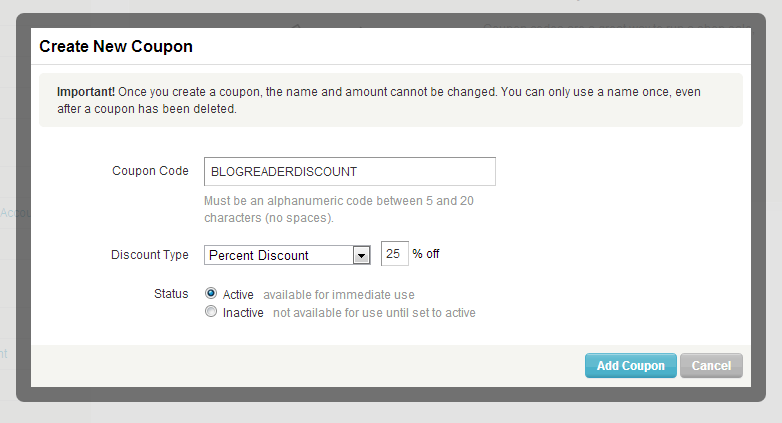
From time to time I like to run a sale in my Etsy shop: http://MarketMyShop.etsy.com Etsy makes it very simple to run a sale. I just put up a 25% off coupon for my shop to show you how easy it is! Just enter code "BLOGREADERDISCOUNT" at checkout! Running a sale is a great way to get a small boost in sales overall. Here is how you create a coupon code on Etsy:
Step 1: Just mouse over your shop name in the top right hand corner of your page and select Coupon Codes.
Step 2: Click on the button that says Create Coupon.
Step 3: Create a unique coupon code. Choose either % discount or Free Shipping. Make sure the Active button is clicked and then hit Add Coupon.
Step 4: Share your coupon code on Facebook, Twitter, Email and any other ways you can think of. Some people even run an advertising campaign with their sales.
Do you run sales in your shop? If so, I would love to hear your experiences. Leave a comment or send me an email to MarketMyShop@gmail.com
Step 1: Just mouse over your shop name in the top right hand corner of your page and select Coupon Codes.
Step 2: Click on the button that says Create Coupon.
Step 3: Create a unique coupon code. Choose either % discount or Free Shipping. Make sure the Active button is clicked and then hit Add Coupon.
Step 4: Share your coupon code on Facebook, Twitter, Email and any other ways you can think of. Some people even run an advertising campaign with their sales.
Do you run sales in your shop? If so, I would love to hear your experiences. Leave a comment or send me an email to MarketMyShop@gmail.com
Wednesday, January 23, 2013 at 8:35 AM
Subscribe to:
Posts (RSS)